
Keep Characters and Styles Consistent Across Images
Build a recognisable series from a strong source.
When an image needs a sequel, start by preserving the decisions that make the character recognisable. This lesson uses the reviewed three-result series from the preceding reference-led baseline: a dark-haired human astronomer in a midnight-blue, star-embroidered coat, carrying a brass star chart and travelling with a horned minotaur guide.
The baseline and both variations used Flux 2 Flash, No Art Style, a 3:2 frame, the same two references and Count 1. The scene is the only planned change. These are dated results from the strict series receipt, not a promise that another run will match them.
Write a stable character record
Write the details you want to protect before you change the scene. Keep this record short enough to reuse without quietly changing its meaning:
- Character: dark-haired human astronomer.
- Wardrobe and prop: midnight-blue star-embroidered coat and brass star chart.
- Companion: horned minotaur guide.
- Main reference role: identity.
- Additional reference role: wide desert composition and ruined-observatory placement.
Use the same character record in each prompt. Name the main reference's job and the additional reference's job separately, so a composition reference is less likely to compete with the character description.
Lock the baseline setup
Keep the character record, model, art style, frame, reference hierarchy and Count fixed for this short experiment. The reviewed baseline shows the astronomer and guide crossing a wide desert toward a ruined observatory at sunset. It used two owned, checksum-bound references and Count 1.
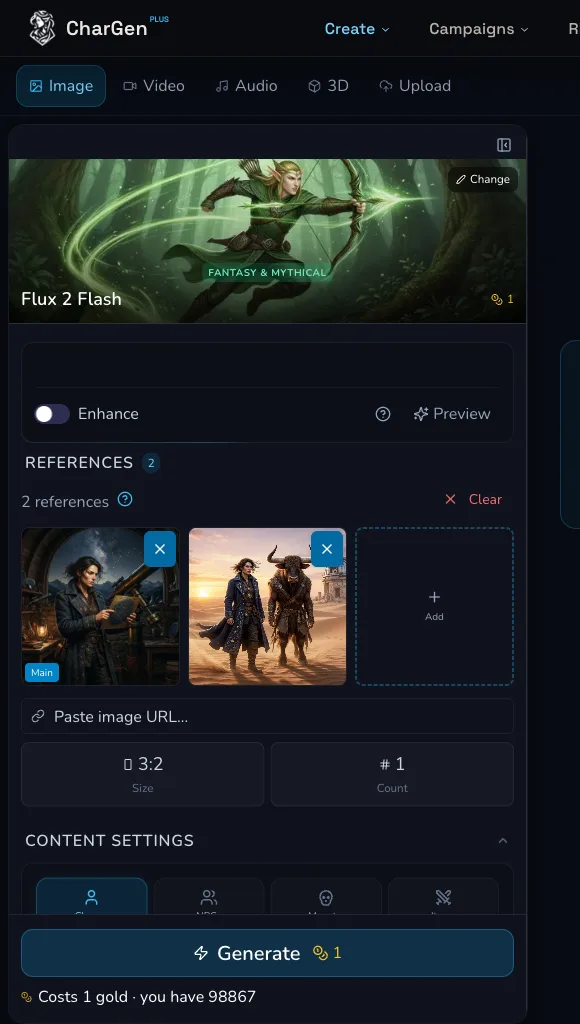
Before submitting, compare the model, style, size, reference roles and Count with your stable record, then read the live Generate estimate.
The series receipt recorded no seed value. A seed can help control an experiment when the selected model exposes it, but it does not guarantee the same output across models or provider runs.
Change one scene variable
Copy the stable setup, then replace only the scene clause. The first reviewed variation changed the baseline scene to the astronomer and guide pausing beside a half-buried brass astrolabe at sunset. The second changed it to climbing a wind-carved ridge above the ruined observatory at sunset.
Do not also change the character record, model, style, size, reference roles or Count. Reconcile a completed request before starting the next variation, so you can tell which change you are reviewing.
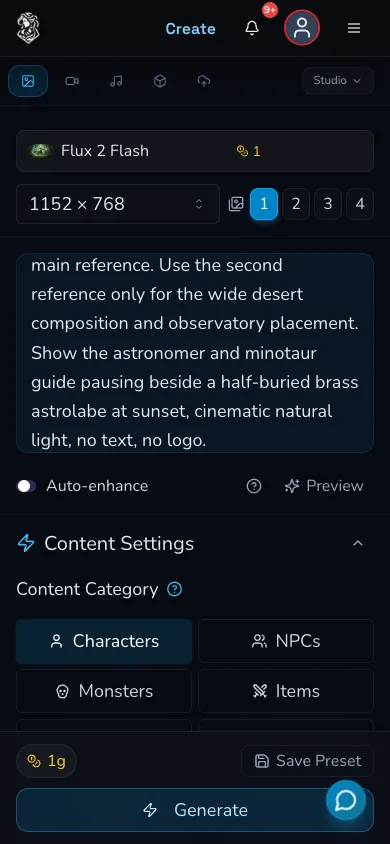
The exact first variation keeps the model, landscape frame and Count fixed while changing the scene to the half-buried astrolabe.
Compare the three-image series
Review the baseline and both completed variations together. The scorecard below is bound to the strict three-result receipt. It records the planned controls, not a likeness score or a claim of deterministic identity.
| Check | Baseline | Astrolabe variation | Ridge variation |
|---|---|---|---|
| Character record | Stable | Stable | Stable |
| Model, style and frame | Flux 2 Flash, No Art Style, 3:2 | Same | Same |
| Reference hierarchy and Count | Two references, Count 1 | Same | Same |
| Planned scene | Crossing toward the observatory | Pausing beside an astrolabe | Climbing a ridge above the observatory |
| Receipt status | Completed baseline | Completed, 1 Gold charged | Completed, 1 Gold charged |
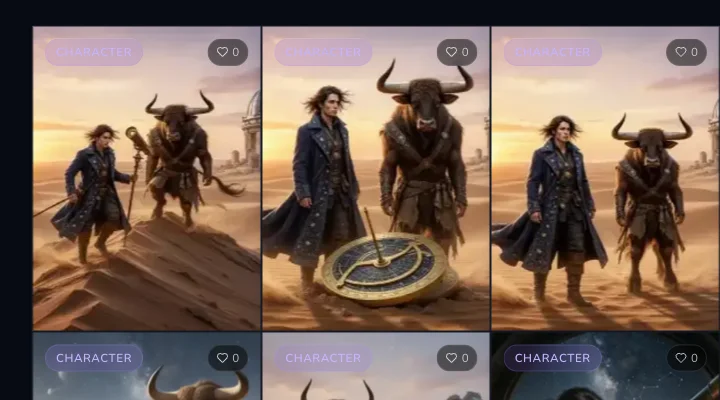
Compare the protected details and the intended scene change side by side. Treat this as a review aid, not proof of exact identity.
Diagnose identity drift
Exact identity is not guaranteed. If the character drifts, start with the clearest mismatch: hair, coat, prop, companion or the role of either reference. Return to the last strong result, restate only the missing protected detail and keep the rest of the stable record unchanged. Remove conflicting style language before adding more detail.
Know when LoRA is a separate project
References are useful for a short, guided series. A LoRA is a separate paid workflow with its own source, rights, dataset, model and training decisions. Do not describe this reference workflow as LoRA training, and do not expect it to guarantee exact identity.
Use a short series first. If continuity requirements outgrow the protected record and reference workflow, review the LoRA workflow separately before collecting or training on a dataset.
Troubleshooting
If something looks wrong
Troubleshooting
- Symptom
- The coat, star chart or companion changed between images.
- Likely cause
- A protected detail may be absent, vague or competing with a scene instruction.
- Next safe action
- Return to the strongest result, restate the missing detail in the stable record and change only one scene clause for the next comparison.
- Symptom
- The new image looks like a different style.
- Likely cause
- The model, style selection or prompt language may have changed.
- Next safe action
- Match the baseline model and style, remove conflicting style language and check the selected form again.
- Symptom
- I cannot tell what caused the drift.
- Likely cause
- More than one setting changed between requests.
- Next safe action
- Rebuild from the last strong baseline and change one scene variable at a time, recording the live estimate before each submission.