
Iterate with Reforge, Seeds and Saved Setups
Improve an existing result without restarting blindly.
An existing result is a better starting point than a blind repeat. Start by identifying the one decision that needs to change, then inspect what the form actually brought forward. The reviewed run restored several settings, but it also omitted both references and did not confirm a temporary Saved Setup.
Diagnose before regenerating
Name the change before you reopen the form. In the reviewed result, character continuity was worth keeping, while the scene needed a deliberately different direction. That points to a prompt revision, not a full reset.
Keep a short record of the choices you intend to preserve: prompt, model, size, Count, style, negative prompt, Seed state and prompt-enhancement state. Then separate those from the single setting you plan to change. This makes the next review legible, even when an image differs for reasons you did not intend.
Load an existing result with Reforge
Open the result in Image Studio and use Reforge to load its reviewed configuration back into the form. Reforge is a starting point for inspection, not a guarantee that every part of a previous request has been copied.
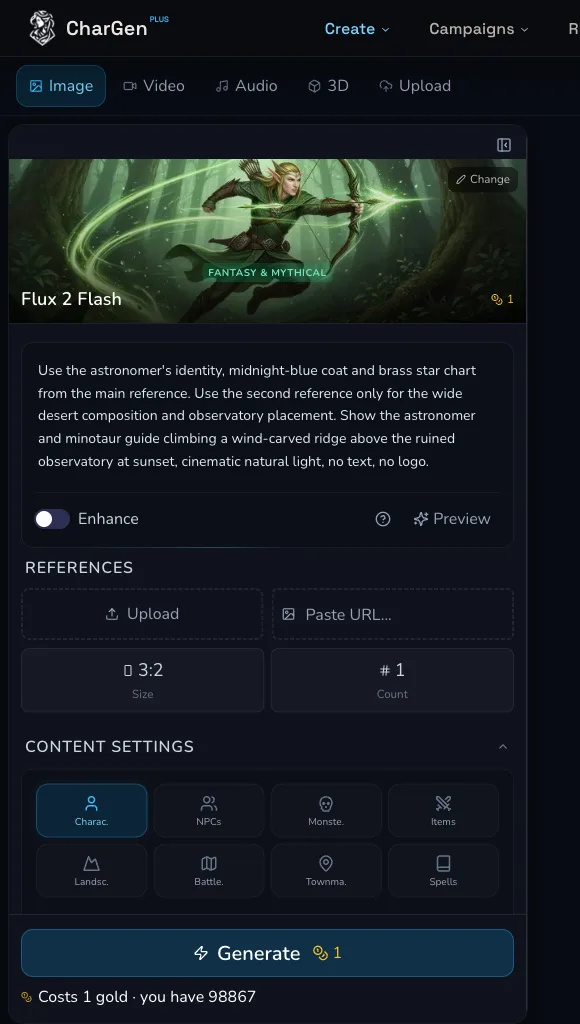
Reforge returns to the Studio form so you can inspect the proposed next request before deciding whether to submit it.
Review restored and omitted settings
The strict receipt records the restoration map for this reviewed result. Check each item against the current form rather than assuming a setting travelled with the image.
| Field | Reviewed result after Reforge |
|---|---|
| Prompt | Restored |
| Model | Restored |
| Size | Restored |
| Count | Restored |
| Art Style | Restored |
| Negative Prompt | Restored |
| Seed | Restored as a visible field with no recorded value |
| Prompt enhancement | Restored |
| Main reference | Omitted |
| Additional reference | Omitted |
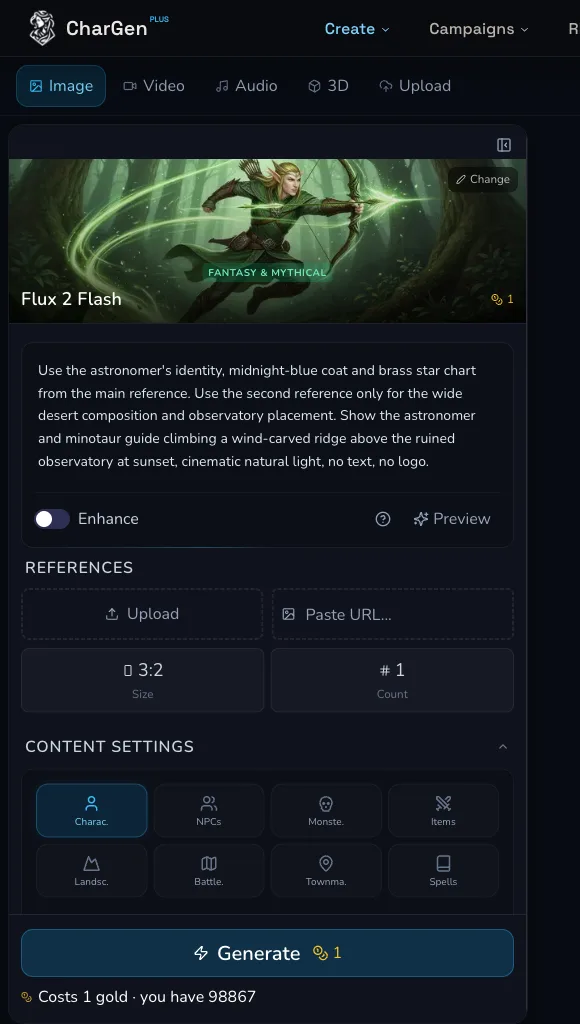
The restored form still shows empty reference inputs. Treat the visible fields as the source of truth for the next request.
Reattach missing references
The reviewed Reforge run omitted both the Main reference and Additional reference. Reattach a cleared source manually before planning a variation that depends on it. Give each reference one job, such as identity or composition, and check the selected model still exposes the input you need.
Check ownership, consent, privacy and current plan permissions before reusing or publishing a reference. Do not assume commercial-use rights. Do not place a private or signed URL in public evidence.
Use a seed as an experiment control
If the selected form exposes Seed, use it as one control in a small experiment: keep the reviewed settings fixed, change the one planned clause, and compare the new result with the source. Record whether the field is blank, set or absent.
A seed can help you control an experiment. It does not guarantee identical output across models, providers or repeated runs. Keep the result, prompt and live estimate with your notes so the next decision has a clear baseline.
Review the Saved Setup attempt
The reviewed account showed a Save Preset action after reload. The attempt to save a temporary setup did not show success and no backend mutation was observed. It was not retried.
The attempt therefore does not prove that the setup was created, applied or deleted. Saved Setup availability is limited to the reviewed account and its current entitlement. If a current form offers the action, wait for a clear success state and verify the result after reload before treating a setup as persisted.
Stop before a paid variation
No paid variation was submitted in this reviewed workflow. Gold was unchanged. That was the correct stopping point once the Saved Setup attempt had not been confirmed, because another variation would have added cost without resolving the evidence boundary.
Before any future paid variation, review the restoration map, reattach any needed references, decide on one change and read the live estimate. Submit only when those checks are complete.
Confirm absence after reload
After reload, no saved setup remained. The mobile capture shows the reviewed form and the Save Preset action after reload. It does not show a confirmed saved setup.
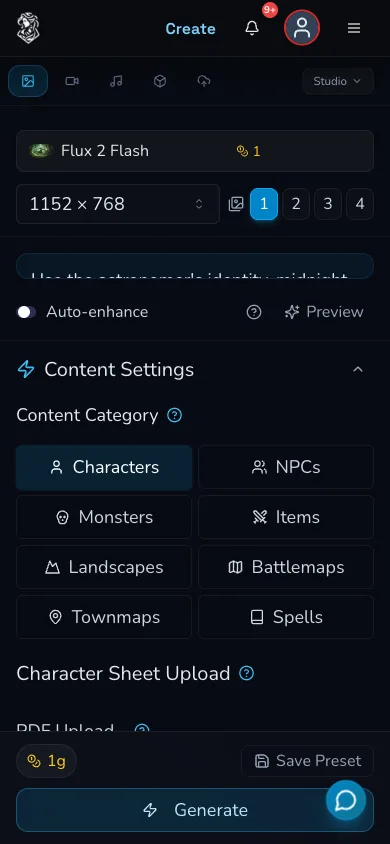
The post-reload form exposes the action, but the reviewed temporary setup was absent. A visible control is not evidence that saving worked.
Troubleshooting
If something looks wrong
Troubleshooting
- Symptom
- Reforge did not bring back a reference I need.
- Likely cause
- References can be omitted from the restored form.
- Next safe action
- Reattach the cleared source manually, give it a distinct role and review the form before you consider a paid variation.
- Symptom
- I cannot tell which setting caused the new result.
- Likely cause
- Several settings changed at once, or the original state was not recorded.
- Next safe action
- Return to the last strong result, list the visible settings and change one planned clause in the next deliberate experiment.
- Symptom
- Save Preset is visible, but I did not receive confirmation.
- Likely cause
- A visible action does not establish a completed backend mutation.
- Next safe action
- Do not assume the setup exists or retry simply to force an outcome. Reload and confirm a saved entry before relying on it.